
HP ProBook 6560b CURE-UMA_HR_HPB MV_MB_V1 Bios Bin.
HP ProBook 6560b CURE-UMA_HR_HPB MV_MB_V1 Bios bin file download. Our all bios and EC bin files are 100% working with Clear ME and have been tested so many times on different machines. If your system has no display after programming this Bios Bin file, it means this Bios Bin is not supported for your system. It may be a motherboard PCB number mismatch. Not only the system model but also the motherboard PCB number, chipset number, CPU, and BIOS chip device ID number need to match.
We believe in reviving technology and minimizing electronic waste. As our field is computers and laptops, we are here trying to provide as much stuff as possible for free to make our contribution. On this platform, you can download confirmed and tested bios files, schematics, BoardView, and other relative materials to make it possible to repair them.
Always remember! First Backup your old Bios chip and save it on a USB or hard drive, then copy the downloaded Bios bin file into the Bios chip. Sometimes the machine states change after programming the Bios chip. It is a good practice to save yourself.
Download bios bin file for HP ProBook 6560b CURE-UMA_HR_HPB MV_MB_V1 from below link!

HP ProBook 6560b CURE-UMA_HR_HPB MV_MB_V1 Schematic diagram.
HP ProBook 6560b CURE-UMA_HR_HPB MV_MB_V1 schematic file download. We believe in reviving technology and minimizing electronic waste. As our field is computers and laptops, we are here trying to provide as much stuff as possible for free to make our contribution. On this platform, you can download confirmed and tested bios files, schematics, BoardView, and other relative materials to make it possible to repair them.
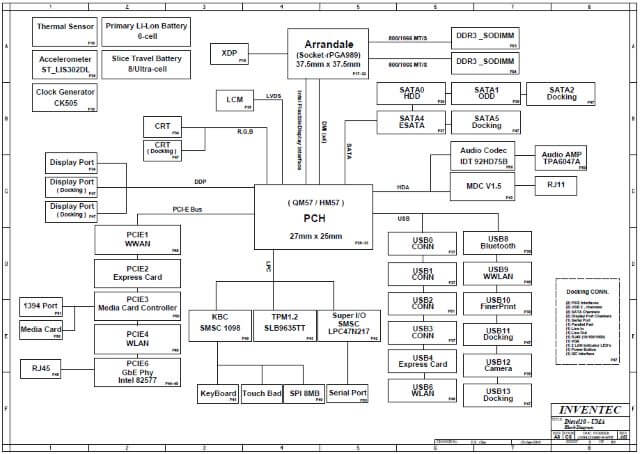
Download schematic diagram file for HP ProBook 6560b CURE-UMA_HR_HPB MV_MB_V1 from below link!